15. Task and Motion Planning via UP Tampest
This Python notebook demonstrates how to model and solve a Task and Motion Planning (TAMP) problem using the Unified Planning library and the Tampest engine.


15.1. Install Requirements
[ ]:
%pip install unified-planning
%pip install "tampest[plot] @ git+https://github.com/fbk-pso/tampest.git"
!yes | pysmt-install --z3
[1]:
import math
from unified_planning.shortcuts import *
from unified_planning.model.motion import *
15.2. Creating Movable Robot
We declare a type for robots using the MovableType.
[2]:
t_robot = MovableType("robot")
15.3. Using a Map
Next we add an occupancy map by using a reference to a YAML file in the format used by the Robot Operating System (ROS). See http://wiki.ros.org/map_server.
[3]:
occ_map = OccupancyMap("./maps/office-map-1.yaml", SE2(0, 0, 0))
15.4. Adding Configuration Types
A configuration specifies a location and orientation in our map.
[4]:
t_robot_config = ConfigurationType("robot_config", occ_map, ConfigurationKind.SE2)
15.5. Adding Fluents
Fluents are added as ususal, but we use our previously added ConfigurationType in place of a regular location.
[5]:
t_parcel = UserType("parcel")

robot_at = Fluent("robot_at", BoolType(), robot=t_robot, configuration=t_robot_config)
parcel_at = Fluent("parcel_at", BoolType(), parcel=t_parcel, configuration=t_robot_config)
carries = Fluent("carries", BoolType(), robot=t_robot, parcel=t_parcel)
15.6. Creating Configuration Objects
Configuration objects combine a symbolic name like parking-1 with a pose. Each pose is a tuple with the number of elements specified by the configuration type (so three in this case).
[6]:
park1 = ConfigurationObject("parking-1", t_robot_config, SE2(46.0, 26.0, -math.pi / 2))
park2 = ConfigurationObject("parking-2", t_robot_config, SE2(40.0, 26.0, -math.pi / 2))

office1 = ConfigurationObject("office-1", t_robot_config, SE2(4.0, 4.0, -math.pi / 2))
office2 = ConfigurationObject("office-2", t_robot_config, SE2(14.0, 4.0, math.pi / 2))
office3 = ConfigurationObject("office-3", t_robot_config, SE2(24.0, 4.0, -math.pi / 2))
office4 = ConfigurationObject("office-4", t_robot_config, SE2(32.0, 4.0, -math.pi / 2))
office5 = ConfigurationObject("office-5", t_robot_config, SE2(4.0, 24.0, -math.pi / 2))
office6 = ConfigurationObject("office-6", t_robot_config, SE2(14.0, 24.0, math.pi / 2))
office7 = ConfigurationObject("office-7", t_robot_config, SE2(24.0, 24.0, math.pi / 2))
office8 = ConfigurationObject("office-8", t_robot_config, SE2(32.0, 24.0, math.pi / 2))
15.7. Adding Movable Objects
Motion planning requires objects that can move in our map. For this purpose we add two MovableObject instances for our robots names r1 and r2.
The footprint specifies the 2-dimensional outline of the robot. The motion model specifies how the robot moves. Here we use the Reeds-Shepp car model (see, e.g., https://lavalle.pl/planning/ch13.pdf) which allows movement forward and backwards, and turning at a specific turning_radius.
[7]:
r1 = MovableObject(
    "r1",
    t_robot,
    footprint=[(-1.0, 0.5), (1.0, 0.5), (1.0, -0.5), (-1.0, -0.5)],
    motion_model=MotionModels.REEDSSHEPP,
    motion_parameters={"turning_radius": 2.0},
)

r2 = MovableObject(
    "r2",
    t_robot,
    footprint=[(-1.0, 0.5), (1.0, 0.5), (1.0, -0.5), (-1.0, -0.5)],
    motion_model=MotionModels.REEDSSHEPP,
    motion_parameters={"turning_radius": 2.0},
)
15.8. Some Additional Objects
Creating some parcels in the regular Unified Planning style.
[8]:
nothing = Object("nothing", t_parcel)
p1 = Object("parcel-1", t_parcel)
p2 = Object("parcel-2", t_parcel)
15.9. Operators
Now we can create operators that can use motion constraints.
15.9.1. Move
The move operators has a motion constraint that requires the robot to move from its current configuration to the goal configuration. Apart from the last line that adds this constraints and the type InstantaneousMotionAction, this looks just like classical planning operators defined in Unified Planning.
[9]:
move = InstantaneousMotionAction(
    "move", robot=t_robot, c_from=t_robot_config, c_to=t_robot_config
)
robot = move.parameter("robot")
c_from = move.parameter("c_from")
c_to = move.parameter("c_to")
move.add_precondition(robot_at(robot, c_from))
move.add_effect(robot_at(robot, c_from), False)
move.add_effect(robot_at(robot, c_to), True)
move.add_motion_constraint(Waypoints(robot, c_from, [c_to]))
15.9.2. Pick
Robots can pick parcels at their current location if they carry nothing. This operator does not use a motion planning constraint.
[10]:
pick = InstantaneousAction(
    "pick", robot=t_robot, loc=t_robot_config, parcel=t_parcel
)
pick_robot = pick.parameter("robot")
pick_loc = pick.parameter("loc")
pick_parcel = pick.parameter("parcel")
pick.add_precondition(robot_at(pick_robot, pick_loc))
pick.add_precondition(parcel_at(pick_parcel, pick_loc))
pick.add_precondition(carries(pick_robot, nothing))
pick.add_precondition(Not(carries(pick_robot, pick_parcel)))
pick.add_effect(carries(pick_robot, pick_parcel), True)
pick.add_effect(parcel_at(pick_parcel, pick_loc), False)
pick.add_effect(carries(pick_robot, nothing), False)
15.9.3. Place
Robots can place objects they carry at their current location. Again, no special motion planning constraint is used.
[11]:
place = InstantaneousAction(
    "place", robot=t_robot, loc=t_robot_config, parcel=t_parcel
)
place_robot = place.parameter("robot")
place_loc = place.parameter("loc")
place_parcel = place.parameter("parcel")
place.add_precondition(robot_at(place_robot, place_loc))
place.add_precondition(carries(place_robot, place_parcel))
place.add_precondition(Not(parcel_at(place_parcel, place_loc)))
place.add_precondition(Not(carries(place_robot, nothing)))
place.add_effect(carries(place_robot, place_parcel), False)
place.add_effect(carries(place_robot, nothing), True)
place.add_effect(parcel_at(place_parcel, place_loc), True)
Finally, we can assemble the problem. There is nothing specific to motion planning here. We use the regular UP syntax.
[12]:
problem = Problem("TAMP")
problem.add_fluent(robot_at, default_initial_value=False)
problem.add_fluent(parcel_at, default_initial_value=False)
problem.add_fluent(carries, default_initial_value=False)
problem.add_action(move)
problem.add_action(pick)
problem.add_action(place)

problem.add_object(park1)
problem.add_object(park2)
problem.add_object(office1)
problem.add_object(office2)
problem.add_object(office3)
problem.add_object(office4)
problem.add_object(office5)
problem.add_object(office6)
problem.add_object(office7)
problem.add_object(office8)

problem.add_object(r1)
problem.add_object(r2)

problem.add_object(nothing)
problem.add_object(p1)
problem.add_object(p2)

problem.set_initial_value(carries(r1, nothing), True)
problem.set_initial_value(carries(r2, nothing), True)
problem.set_initial_value(parcel_at(p1, office1), True)
problem.set_initial_value(parcel_at(p2, office6), True)
problem.set_initial_value(robot_at(r1, park1), True)
problem.set_initial_value(robot_at(r2, park2), True)

problem.add_goal(robot_at(r1, park1))
problem.add_goal(parcel_at(p1, office2))
problem.add_goal(parcel_at(p2, office3))
15.10. Solve the Problem and Show the Result
Now we can solve the problem and print the result. If a path exists, we plot it.
[13]:
env = get_environment()
env.factory.add_engine("tampest", "tampest.engine", "TampestEngine")

with OneshotPlanner(name="tampest") as planner:
    res = planner.solve(problem)

if res.plan:
    print("SOLUTION FOUND!")
    print(res)
else:
    print("NO SOLUTION FOUND!")
SOLUTION FOUND!
status: SOLVED_SATISFICING
engine: TAMPEST
plan: SequentialPlan:
    move(r1, parking-1, office-6)
    move(r2, parking-2, office-1)
    pick(r1, office-6, parcel-2)
    move(r1, office-6, office-3)
    pick(r2, office-1, parcel-1)
    move(r2, office-1, office-2)
    place(r1, office-3, parcel-2)
    move(r1, office-3, parking-1)
    place(r2, office-2, parcel-1)
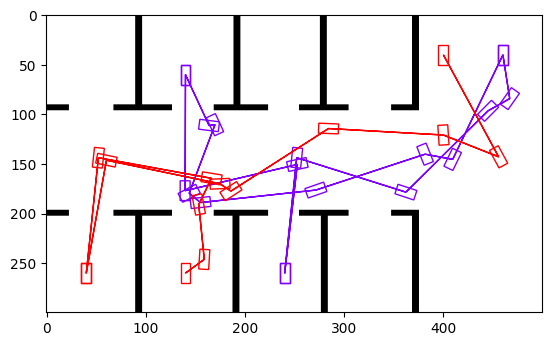
15.11. Plotting the Solution
Assuming there is a solution, we can use the plot_plan function to inspect it:
[14]:
from tampest.motion.plotting import plot_plan

plot_plan(problem.all_objects, res)